
Joysticks
- Relevance
- Price: Low - High
- Price: High - Low
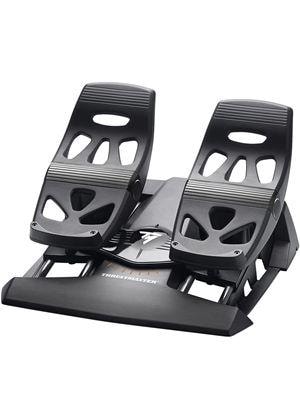
Compatible Platforms: PC, PS4, PS5, Xbox One, Xbox Series X|S • Type: Rudder pedals • Connectivity: Wired (USB)
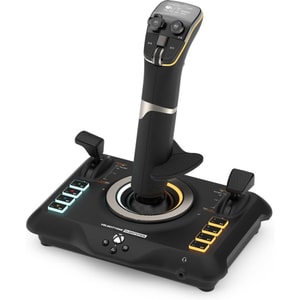
Compatible Platforms: PC, Xbox One, Xbox Series X|S • Type: Joystick • Connectivity: Wired (USB) + Wireless (Bluetooth)
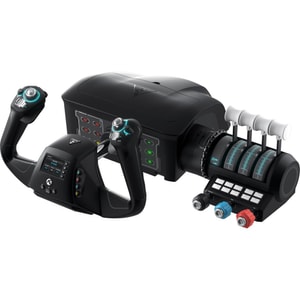
Compatible Platforms: PC, Xbox One, Xbox Series X|S • Type: Yoke system & throttle quadrant • Connectivity: Wired (USB)
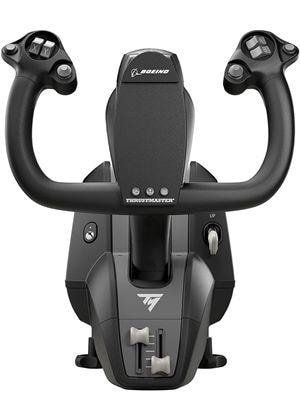
Compatible Platforms: PC, Xbox One, Xbox Series X|S • Type: Yoke and throttle quadrant set • Connectivity: Wired (USB)
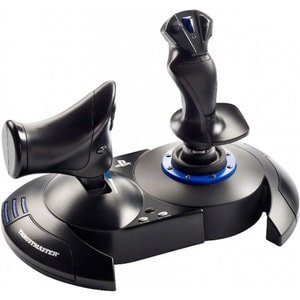
Compatible Platforms: PC, PS4, PS5 • Type: Joystick and throttle set • Connectivity: Wired (USB)
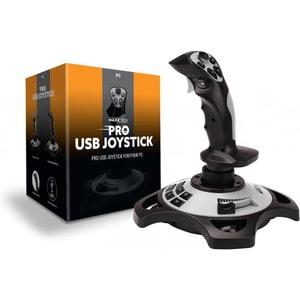
Compatible Platforms: PC • Type: Joystick • Connectivity: Wired (USB-A)
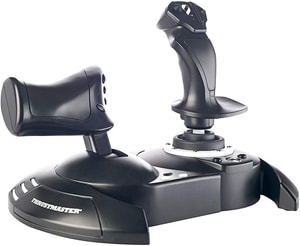
Compatible Platforms: PC, Xbox One, Xbox Series X|S • Type: Joystick and throttle • Connectivity: Wired (USB)
Joysticks: more natural control for flight sims and space games
A joystick makes fine inputs easier. You can ease into pitch and roll, trim small corrections, and keep key actions on buttons rather than buried in menus. If you search for a flight stick, HOTAS joystick, or PC joystick, you are usually looking for that “hands-on” feel that a standard pad struggles to replicate. Read More...
This category covers flight sticks, HOTAS (hands on throttle and stick) sets, plus specialist hardware such as yokes and rudder pedals. If you are browsing the wider department first, Gaming is a useful hub for consoles, games and accessories, then return here once you know what you play on most.
Pick your setup: stick, HOTAS, yoke, and pedals
Start with the kind of flying you enjoy and how much desk space you have. A single flight stick suits casual flying and space games, while a HOTAS joystick and throttle set is better when you want smoother speed control and more switches within reach. Yokes are aimed at civil aviation style flying, and rudder pedals add yaw control and, on some models, toe brakes.
Flight sticks and HOTAS: fewer menus, more muscle memory
A good flight stick prioritises comfort, a stable base, and enough buttons and hats for views, trim, flaps, or weapons. HOTAS setups add a dedicated throttle, which can make power changes feel more gradual and believable, and some include a detachable throttle unit for easier positioning. Extra controls only matter if you will map and use them, so aim for a layout that matches the sim you actually play. If you are left-handed, look for ambidextrous grips or swappable hand rests.
Yokes and throttle quadrants: when cockpit feel matters
If you are shopping for a flight simulator yoke, the goal is precision and immersion across longer sessions. Yokes are bulkier than sticks, so check mounting and clearance first. If your favourite aircraft rely on smooth throttle changes, a quadrant-style setup can feel more intuitive than a single lever.
Compatibility first: PC, Xbox, and PlayStation
Joystick support is not universal. Many models are PC-focused, while others are certified for a specific console family. Confirm the target platform before you compare features, because a great stick that does not support your system will not be useful. If you are still deciding on hardware, Games Consoles is the simplest place to confirm the platform before committing to flight controls.
Most joysticks connect by USB and are designed to be used wired. Treat “plug-and-play” as a goal rather than a guarantee, and expect a short first session to map controls and check sensitivity. When you want to browse compatible titles by platform, Console Games is the quickest hub to explore.
Precision and feel: what you notice after an hour
Two joysticks can look similar and feel completely different. Look for smooth movement, predictable centring, and a base that does not slide during fine adjustments. Many sticks include adjustable sensitivity or software profiles, which can help you tune response for helicopters, jets, and space sims without constantly re-learning your inputs.
You will also see magnetic or “contactless” sensor marketing (often described as Hall effect). These designs are typically positioned as a way to reduce wear in the sensor mechanism over time. Treat it as a model-by-model feature and prioritise comfort and stability first.
Yaw control: twist rudder versus rudder pedals
Twist rudder on the stick saves space and works well for casual flying. Rudder pedals can feel more natural for helicopters and careful ground handling because your feet control yaw while your hands stay focused on pitch and roll. If you are upgrading in stages, pedals are often the first add-on that changes the experience noticeably.
Setup and mounting: desk space, clamps, and storage
Most sticks rely on weight, rubber feet, or clamps to stay stable. If you pack your kit away after each session, prioritise a base that is easy to move and quick to re-seat in the same spot. If you have a permanent sim corner, proper mounting can improve consistency by keeping the stick and throttle exactly where your hands expect them.
If you also race, Steering Wheels is the natural category for wheel-and-pedal setups that deliver a similar “hands-on” feel for driving.
A simple way to choose well
Start with platform compatibility, then choose the style that matches your favourite games: stick, HOTAS, or yoke. Next, prioritise stability and comfort, because those decide whether you will use it regularly. Finally, add realism with rudder pedals or a throttle quadrant once you know you want more depth.
If you fly online and rely on voice chat, a comfortable mic matters more than flashy marketing. Gaming Headsets can help you stay clear through longer sessions.