
Computer Microphones
- Relevance
- Price: Low - High
- Price: High - Low
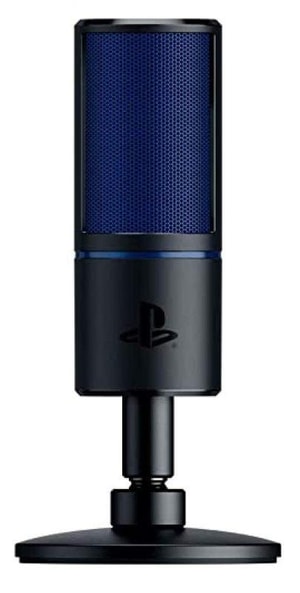
Connectivity: USB • Microphone Type: Condenser • Polar Pattern: Supercardioid
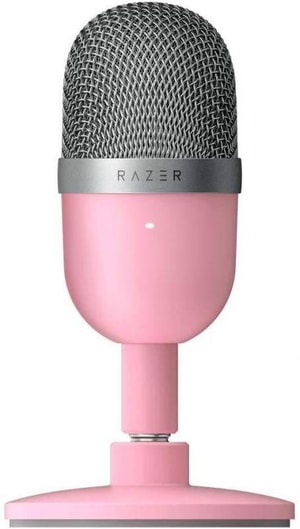
Connectivity: USB • Microphone Type: Condenser • Polar Pattern: Supercardioid
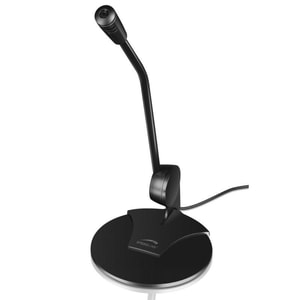
Connectivity: 3.5 mm • Microphone Type: Desktop Microphone • Polar Pattern: Omnidirectional
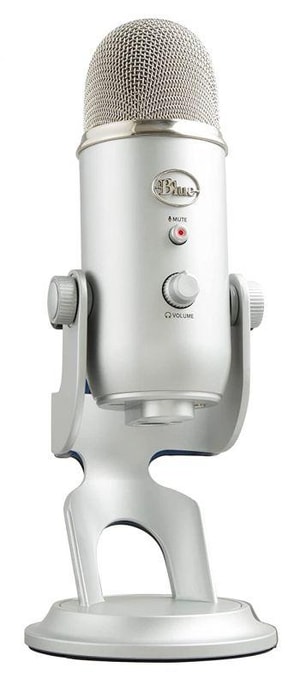
Connectivity: USB • Microphone Type: Condenser • Polar Pattern: Cardioid; Omnidirectional; Bidirectional; Stereo
Computer microphones: sound like yourself, not your room
Whether you are joining a Teams call, recording a podcast, streaming a game, or just trying to be heard clearly at home, a dedicated computer microphone can make a noticeable difference. Built-in laptop mics often pick up more room sound and keyboard clatter, which can make your voice feel distant. A good mic helps your voice come through clearly and naturally. Read More...
If you are shopping for a desktop microphone or a conference-style mic for calls, the key is keeping your voice clear without pulling in the whole room. That usually comes down to choosing the right pickup pattern, keeping the mic at a sensible distance, and picking a style that suits your space.
Start with what you do most often
Video calls, interviews, and everyday chat
For meetings and calls, clarity beats “studio” sound. Look for a mic that keeps your voice present even if your room is not treated. A physical mute button and a headphone socket for monitoring are genuinely useful when you are hopping between calls, especially if you want to avoid the “am I muted?” panic.
If you are often on camera, desk placement matters as much as the microphone itself. A mic that sits comfortably just out of frame, close enough to capture your voice without needing high gain, tends to sound more confident and less echoey.
Streaming, gaming chat, and live content
Streaming is about focus. You want your voice to cut through without dragging in PC fan noise and desk thumps. Directional pickup and sensible placement usually matter more than fancy lighting. If you share a room, prioritise background noise control and a mic that behaves well close to your mouth.
Podcasts, voiceovers, and recorded content
With recorded voice, consistency matters. A mic that captures detail is great, but only if your room is quiet enough to support it. In a lively room, a less sensitive mic used close to your mouth can sound better than a more “detailed” option on paper, simply because it captures more of you and less of everything else.
USB vs XLR microphones: the connection choice that shapes everything
Most computer microphones fall into two camps: a USB microphone that plugs straight into your computer, and an XLR microphone that connects through an audio interface. USB is popular because it is simple and self-contained. XLR is modular: you can mix and match microphones and interfaces over time, and expand to multiple mics more easily.
The practical decision is your appetite for kit. If you want one tidy purchase for calls, streaming, and light recording, USB is usually the easiest win. If you want more flexibility, multiple microphones, or a clear upgrade path, XLR can be worth the extra hardware.
With XLR, the interface is the piece that converts the microphone’s analogue signal into digital audio your computer can use. That is why XLR setups have a couple more parts, but also why they can grow with you over time.
You will also see hybrid microphones that offer both USB and XLR. They can be a tidy middle ground if you want plug-in simplicity today, but the option to add an interface later.
Dynamic vs condenser microphones: let your room make the call
Microphone type affects sensitivity and how much it hears beyond your voice.
Dynamic microphones for busy rooms
Dynamic microphones are commonly chosen when you want to reduce background noise from keyboards, fans, and household sound. They are typically less sensitive than condensers, which can make them easier to manage in everyday home setups where the room is not treated.
Condenser microphones for detail and a quieter setup
Condenser microphones are often picked for voiceover and podcasting because they capture more detail. They are usually more sensitive, which is brilliant in a quiet room, but less forgiving if your space has echo or constant background noise.
If you are unsure, a sensible rule is this: noisy room, lean dynamic. Quiet room, lean condenser. Your room decides more than most people expect.
Polar patterns: directionality that helps your voice stand out
If you have ever wondered why cardioid is recommended for desks, it is because directional patterns reject more sound from unwanted angles. Polar pattern means where the mic listens, and for desk use, directionality is your friend.
Cardioid for most desks
Cardioid is the most common directional pattern. It focuses on sound from the front and rejects more from the rear, which helps reduce room sound compared with omnidirectional microphones. For most desks, cardioid is the straightforward choice, especially if you can point the “front” of the mic towards your mouth and keep it reasonably close.
Supercardioid and hypercardioid for tighter focus
Supercardioid and hypercardioid tighten the pickup at the front, which can help in noisier rooms. The trade-off is more sensitivity to some rear angles, so placement matters. If you have a loud source behind you, such as a PC tower, you will want to think about where it sits relative to the mic.
Omnidirectional when you need wider pickup
Omnidirectional mics hear more evenly around the capsule. They can be useful for capturing more than one person around a table, but they usually pick up more room sound, so they are less forgiving in echoey spaces.
Desk-friendly features that matter in real life
Once you have type and pattern right, daily usability often comes down to a few practical touches.
- Placement and mounting: a stable stand is fine, but a boom arm helps you keep the mic close without it blocking your screen. Closer placement usually means lower gain, which can reduce room noise.
- Pop filter: plosive sounds (p and b) can overload a mic. A pop filter is a small add-on that can make speech sound cleaner.
- Shock mount: if your desk vibrates when you type, a shock mount can reduce thumps travelling into the mic.
- Monitoring and controls: a headphone socket for direct monitoring, plus a gain control and mute button, can make a mic far easier to live with.
If you are searching for a noise cancelling microphone, directionality (usually cardioid) and close placement do most of the work, with software noise suppression as the finishing touch.
In a full setup, microphones sit alongside other computer audio peripherals, so it is worth thinking about how you will monitor sound while you record or call.
If you type loudly, microphone choice links back to your input kit. Quieter computer keyboards can reduce what the mic needs to fight against, especially on calls and streams.
A quick compatibility and confidence check before you buy
Before you choose a model, do a quick reality check on your setup.
- Connections: confirm whether you want USB-A, USB-C, or XLR with an interface. If your main device is portable, check what ports are available on laptops so you are not surprised by adapters.
- Space: decide whether the mic will live on the desk or on an arm, and whether it will sit comfortably in front of your monitor.
- Use case: calls need clarity, streaming needs focus, and recording needs consistency.
- Environment: if your room is lively and echoey, prioritise directionality and close placement over “more sensitive”.
- Monitoring: if you want to hear yourself while you speak, look for direct headphone monitoring.
If you follow those checks, you end up with a microphone that suits your routine, and you will sound like yourself, not like you are speaking from the end of a hallway. And if you are refreshing the whole desk, computer peripherals are worth a quick look too.