
OLED vs QLED vs Mini-LED: how to choose the right TV for your room, sport, and gaming
 27/01/2026
You can spend hours comparing TVs and still end up unsure because the labels sound similar and the marketing is louder than the differences that matter. OLED, QLED, and Mini-LED are not competing “brands”. They are different ways of producing light and controlling contrast, and that changes how a TV behaves in a bright room, in a dark film night setup, and during fast sports or console gaming.
Quick answer (if you want the decision in 30 seconds):
- Choose OLED for the strongest contrast, deep blacks, and film-night detail, especially in dim rooms.
- Choose Mini-LED if you want high brightness for daytime viewing plus better black control than basic LCD.
- Choose QLED if you want a bright, colourful picture with lots of choice across price points.
This guide focuses on real living rooms and real habits, not showroom demos. If you want to browse the wider category while you read, TV & Audio is the natural starting point.
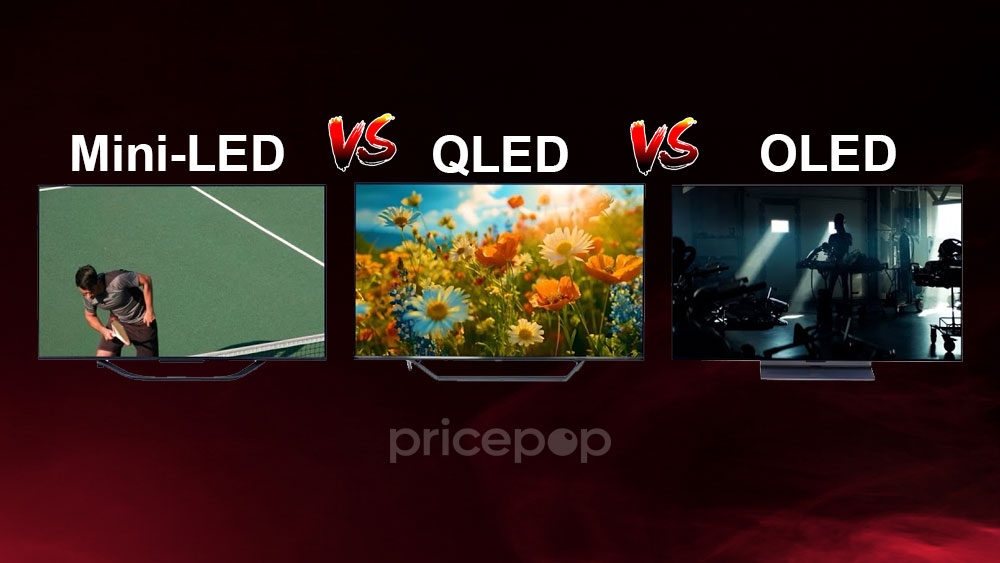
OLED, QLED, and Mini-LED explained clearly, with the trade-offs that matter
At the simplest level, the key question is this: does the TV create its own light at each pixel, or does it use a backlight behind the panel?
OLED TVs are self-lit. Each pixel emits its own light, which is why OLED is known for deep blacks and contrast that looks effortless in darker scenes. When a pixel is off, it is genuinely off. That tends to make films, drama, and games with lots of shadow detail look more three-dimensional, and it is why people weighing OLED vs QLED for a bright room often end up asking a second question: will my room lighting let me see OLED’s contrast advantage?
QLED is an LCD TV with a backlight and a quantum dot layer designed to improve colour and brightness. In practice, many QLED models are bright and punchy, which can be a genuine advantage in rooms with lots of daylight or reflective surfaces. The trade-off is that blacks are limited by the backlight, so very dark scenes can look more grey than OLED, especially if the TV has weaker backlight control.
Mini-LED is also an LCD TV, but with a more advanced backlight that uses many smaller LEDs, typically paired with local dimming. That is the point of Mini-LED: better control over which parts of the screen are bright and which are dark, so highlights pop while black areas stay darker. A strong Mini-LED can be a compelling middle ground for people who want brightness for daytime sport and still care about contrast for film nights.
Table 1: Comparison of TV panel technologies (what each one is best at)
| Technology | What it is | Best for | Strengths you will actually notice | Trade-offs to be aware of |
|---|---|---|---|---|
| OLED | Self-lit pixels, no backlight | Film nights, dark-room viewing, mixed TV and gaming | Black levels and contrast, shadow detail, wide viewing angles | Peak brightness in very bright scenes can be lower than top LCDs; burn-in risk exists if static elements dominate for long periods. |
| QLED (LCD) | LCD with quantum dots and a backlight | Bright rooms, daytime sport, general TV | Higher brightness, vibrant colour, often good value across sizes | Blacks and contrast depend heavily on backlight quality; viewing angles vary by panel type. |
| Mini-LED (LCD) | LCD with Mini-LED backlight and local dimming | Bright rooms plus better contrast, sport, mixed use | Bright highlights with improved black control compared with basic LCD, strong for fast motion | Haloing can appear around bright objects on dark backgrounds; quality varies widely by model and dimming zones. |
Comparison: a quick decision shortcut that stays practical
If your main goal is a “cinematic” picture in the evening, OLED is the clearest choice. If your main problem is glare and a dull picture in daylight, QLED and Mini-LED tend to feel more comfortable. If you are comparing Mini-LED vs OLED for sports, think about when you watch: daytime matches and bright rooms often favour high-brightness LCD-based sets, while evening viewing often favours OLED’s contrast.
If you are at the “show me options” stage, Televisions is the best place to browse across sizes and technologies without locking yourself into one brand.
Choose based on your room and habits, because that is where the differences show up
Most disappointment comes from buying the right technology for someone else’s room. Use these scenarios as your anchor.
Bright rooms and daytime viewing
A bright room changes what you notice. Reflections and ambient light lift perceived black levels, which can blunt OLED’s advantage. This is where strong QLED and Mini-LED sets can shine: they can push more brightness and keep the image looking lively in daytime viewing. If your personal sticking point is “a TV that looks good in sunlight”, prioritise brightness performance, reflection handling, and local dimming quality over showroom contrast.
Film nights and dim rooms
In a dimmer room, OLED’s strengths are easier to appreciate: black levels, shadow detail, and subtle gradients that keep dark scenes from looking washed. If you have ever watched a night-time scene and felt it looked grey rather than black, that is often the backlight showing its limits. A strong Mini-LED can narrow the gap, but OLED tends to deliver the cleanest consistency in dark content.
Sport and fast motion
Sport is bright, fast, and often full-screen. That combination can favour a bright LCD-based TV, particularly when you want the pitch, ice, or court to look crisp without the whole screen dimming. Mini-LED can be excellent here when local dimming and motion processing are well executed. OLED can still be very good for sport, but if your sport viewing is mostly daytime, brightness behaviour can matter more than perfect blacks.
Static on-screen elements and “is OLED burn-in still a problem?”
Burn-in anxiety often gets exaggerated, but it is not imaginary. OLED burn-in is most relevant in repeatable scenarios with lots of static bright elements, such as permanent news tickers, fixed logos, or paused screens for long stretches. Many TVs include mitigation features, and varied viewing reduces the risk. If your household repeats the same channel for hours daily with static elements, a QLED or Mini-LED set can be the calmer choice.
Specs that matter for gaming, HDR, and sound, without buying badges you will not use
Once you have picked a shortlist by room and habits, the right specs stop you from paying extra for features that never show up, or missing the ones that change the experience.
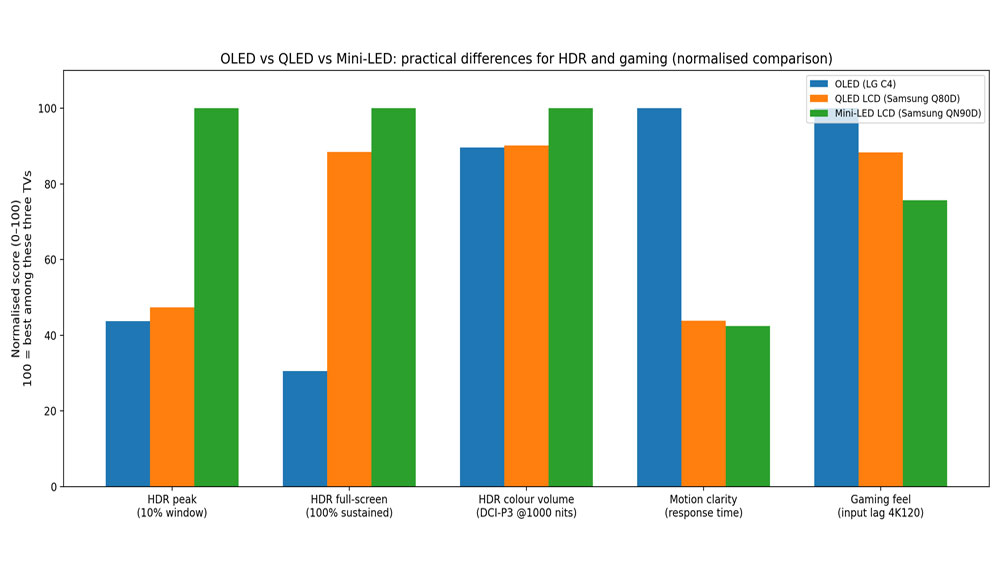
| Technology (representative model) | HDR peak 10% window (nits) | HDR full-screen sustained (nits) | HDR colour volume (DCI-P3 @ 1000 nits, %) | Total response time (ms) | Input lag 4K@120 (ms) |
| OLED (LG C4) | 923 | 195 | 79.2 | 3.9 | 5.3 |
| QLED LCD (Samsung Q80D) | 999 | 564 | 79.7 | 8.9 | 6.0 |
| Mini-LED LCD (Samsung QN90D) | 2109 | 638 | 88.4 | 9.2 | 7.0 |
Gaming: 120Hz, VRR, and ALLM, plus how many HDMI ports actually support them
For modern console and PC play, three features carry most of the practical value:
- 120Hz support: smoother motion when the source can output higher frame rates.
- VRR (Variable Refresh Rate): helps reduce tearing and stutter by letting the TV refresh in step with the console or PC.
- ALLM (Auto Low Latency Mode): switches the TV into a lower-lag mode automatically when you start gaming.
These features are commonly associated with HDMI 2.1 capability, but the detail that matters is what each HDMI port supports. Some TVs have only one fully featured port, and that matters if you have multiple devices. If you are looking for a best gaming TV with HDMI 2.1, treat port capability and input lag as non-negotiable checks, then choose your panel type for the room.
If gaming is a major use case, the Gaming category is a useful place to sanity-check the rest of your setup, including consoles and accessories that influence your overall experience.
HDR formats: Dolby Vision vs HDR10, and where HDR10+ fits
HDR is about brighter highlights, deeper contrast, and better colour volume when content is mastered well. The two names most people see are HDR10 and Dolby Vision.
A simple way to remember the difference:
- HDR10 uses static metadata: the tone mapping guidance does not change scene by scene.
- Dolby Vision uses dynamic metadata: the guidance can adjust across scenes, which can help maintain detail in both highlights and shadows.
HDR10+ is another dynamic-metadata format that appears on supported TVs and services. You do not need to memorise format politics. You just want a TV that supports the HDR formats you are likely to watch, so you are not leaving picture quality behind. If you have ever wondered about the Dolby Vision vs HDR10 difference, this is the practical takeaway: format support matters most when the TV’s brightness and tone mapping are already strong.
Sound: eARC, dialogue clarity, and an upgrade path that does not become a project
Many modern TVs are thin, and thin cabinets limit speaker size. If you keep turning the volume up for dialogue then down again during action scenes, it is usually the TV’s small speakers struggling with midrange clarity, not your hearing.
Two checks make audio upgrades simpler:
- eARC support: helps carry higher-quality audio formats back to a sound system over a single HDMI cable.
- Enough HDMI ports: lets you connect your devices without swapping cables.
If you are considering better sound, Sound Bars is a sensible next step. A well-chosen soundbar often improves dialogue clarity immediately and gives films and sport more presence without filling the room with equipment.
A checklist to avoid buyer’s remorse, plus a quick note on accuracy
Use this checklist to keep your shortlist grounded:
1) Room brightness: is it mainly a bright daytime room, or mostly evening viewing?
2) Viewing habits: films and drama, sport, general TV, or a lot of gaming?
3) Static elements: lots of news tickers, channel logos, or paused screens for long periods?
4) Gaming needs: do you want 120Hz and VRR, and how many HDMI ports need to support it?
5) HDR expectations: do you care about Dolby Vision, HDR10+, or simply “good HDR” done well?
6) Audio plan: will you stick with TV speakers, or do you want eARC-ready soundbar support?
If your main goal is a big screen feel but you do not want a very large TV on the wall, a projector can be a compelling alternative for film nights. If that sounds like you, Projectors is worth a look.
Notes on accuracy: This guide focuses on behaviours that consistently show up in official specifications and independent testing, such as brightness trends, local dimming limitations (including haloing), format metadata behaviour, and the conditions most associated with OLED image retention and burn-in. Where performance varies heavily by model, the advice prioritises decision factors that you can validate in trusted reviews and manufacturer documentation.